SAP software, a powerhouse in the realm of enterprise resource planning, has transformed the way businesses operate and manage their resources. Exploring the depths of SAP software unveils a world of innovation and efficiency that is reshaping industries worldwide.
Advertisement






From its inception to its integration with cutting-edge technologies, SAP software stands as a beacon of progress and optimization in the corporate landscape. Dive into the intricacies of SAP software to discover a realm of possibilities for organizational growth and success.
Overview of SAP Software
SAP Software, developed by SAP SE, has a rich history dating back to 1972 when it was founded in Germany. Over the years, SAP has evolved into a leading provider of enterprise software solutions, specializing in ERP systems.
History and Evolution of SAP Software
SAP software initially focused on developing standard business applications for real-time data processing. As technology advanced, SAP expanded its offerings to include a wide range of integrated modules for various business functions such as finance, human resources, supply chain management, and more. The introduction of SAP R/3 in the 1990s revolutionized ERP systems by providing a client/server architecture and a modular structure.
Advertisement
Key Features and Functionalities of SAP Software
- Comprehensive Integration: SAP software offers seamless integration across different modules, allowing for real-time data flow and efficient communication between departments.
- Customization: Users can customize SAP software to meet their specific business needs through configuration options and development tools.
- Analytics and Reporting: SAP provides advanced analytics and reporting capabilities, allowing businesses to gain insights from data and make informed decisions.
- Cloud Capabilities: SAP offers cloud-based solutions, enabling businesses to access software and data remotely, leading to increased flexibility and scalability.
Comparison with Other ERP Systems
SAP software stands out from other ERP systems due to its robust functionality, scalability, and industry-specific solutions. While other ERP systems may offer similar features, SAP’s extensive experience and global presence make it a preferred choice for many large enterprises. Additionally, SAP’s continuous innovation and commitment to research and development ensure that its software remains at the forefront of technological advancements in the industry.
Implementation of SAP Software
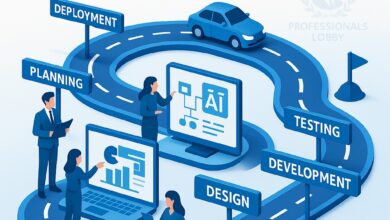
Implementing SAP software in an organization can be a complex process that requires careful planning and execution. Here is a step-by-step guide to help you navigate through the implementation process successfully.
Step-by-Step Guide to Implementing SAP Software:
- 1. Planning Phase:
- Define project scope, objectives, and timeline.
- Identify key stakeholders and form a project team.
- Conduct a thorough analysis of current processes and systems.
- 2. System Design:
- Create a detailed system design based on business requirements.
- Customize SAP software to fit the specific needs of the organization.
- Develop a data migration strategy to transfer existing data to the new system.
- 3. Testing and Training:
- Perform extensive testing to ensure the system functions correctly.
- Provide comprehensive training to users on how to use the new software.
- Address any issues or concerns that arise during testing and training.
- 4. Go-Live and Support:
- Launch the SAP software in a live environment.
- Provide ongoing support and maintenance to users.
- Monitor system performance and make necessary adjustments.
Challenges and Best Practices in SAP Software Implementation:
- Challenges:
- Resistance to change from employees.
- Data migration issues leading to loss of critical information.
- Integration with existing systems and processes.
- Best Practices:
- Engage stakeholders early and often throughout the implementation process.
- Ensure clear communication and training for all users.
- Regularly review and update the implementation plan based on feedback and progress.
Real-World Examples of Successful SAP Software Implementations:
- 1. Coca-Cola:
- Coca-Cola implemented SAP software to streamline its supply chain and improve operational efficiency.
- The implementation resulted in better inventory management and cost savings for the company.
- 2. Amazon:
- Amazon utilized SAP software to enhance its customer service capabilities and manage its vast e-commerce operations.
- The implementation improved order processing and delivery times for Amazon customers.
Modules in SAP Software
SAP software offers a wide range of modules that cater to different business functions and processes. Each module serves a specific purpose and contributes to the overall efficiency of an organization’s operations.
Advertisement
SAP FI (Financial Accounting)
Financial Accounting module in SAP helps in managing financial transactions, generating financial statements, and ensuring compliance with financial regulations. It handles tasks such as accounts receivable, accounts payable, general ledger, and asset accounting.
SAP MM (Materials Management)
Materials Management module focuses on procurement and inventory management. It helps in managing material procurement, inventory control, invoice verification, and material valuation. This module ensures efficient supply chain management within an organization.
SAP SD (Sales and Distribution)
Sales and Distribution module in SAP deals with sales processes, order processing, and distribution of goods to customers. It helps in managing sales orders, pricing, delivery, and billing processes. This module plays a crucial role in streamlining sales operations and enhancing customer satisfaction.
Integration of Modules within SAP Software
The integration of modules within SAP software is seamless and ensures data consistency and real-time information flow across different functions. For instance, the data from the Sales and Distribution module can directly impact the Financial Accounting module, ensuring accurate financial reporting based on sales transactions. This integration enhances operational efficiency and decision-making capabilities within an organization.
Customization and Configuration of SAP Software
Customizing SAP software to meet specific business requirements is a crucial step in maximizing its efficiency and effectiveness. By tailoring the software to align with the unique processes and needs of a company, organizations can optimize their operations and enhance overall performance.
Customization Process
- Identify business requirements: Companies need to clearly define their specific needs and objectives to determine what aspects of the SAP software need customization.
- Configuration settings: Modify the software settings to align with the business processes, data structures, and user roles within the organization.
- Enhancements and extensions: Develop additional functionalities or features to address unique requirements that are not available in the standard SAP software.
Importance of Configuration
- Optimizing performance: Proper configuration of SAP software ensures that it operates efficiently and effectively, leading to improved productivity and streamlined processes.
- Enhanced user experience: Configuring the software to match user preferences and workflows results in a more intuitive and user-friendly interface, increasing user adoption and satisfaction.
- Scalability and flexibility: Configuration allows for scalability as businesses grow and evolve, enabling the software to adapt to changing needs and requirements.
Examples of Customization
Companies across various industries have successfully customized SAP software to improve efficiency and achieve their business goals. For instance, a manufacturing company may customize the production planning module to align with its unique production processes, resulting in optimized production schedules and reduced lead times. Similarly, a retail company may customize the customer relationship management module to enhance customer engagement and loyalty through personalized marketing campaigns and targeted promotions.
Benefits of SAP Software
Implementing SAP software in an organization provides a wide range of benefits that contribute to its overall efficiency and effectiveness. From streamlining business processes to enabling data-driven decision-making, SAP software plays a crucial role in enhancing operational performance.
Improved Efficiency and Productivity
- Automation of repetitive tasks leads to time savings and increased productivity.
- Real-time data access allows for quicker decision-making and response to market changes.
- Integration of various functions reduces manual errors and improves overall efficiency.
Enhanced Business Processes
- Standardization of processes across departments ensures consistency and alignment with organizational goals.
- Optimization of workflows enables smoother operations and better resource utilization.
- Streamlining of supply chain management results in reduced lead times and improved customer satisfaction.
Data-Driven Decision-Making
- Access to real-time analytics and reporting tools helps in identifying trends and patterns for strategic decision-making.
- Centralized data repository ensures data integrity and consistency across the organization.
- Advanced forecasting capabilities enable proactive planning and risk management.
Training and Support for SAP Software
Training and support are crucial aspects of maximizing the effectiveness of SAP software. Users need to be well-equipped with the necessary knowledge and skills to leverage the full potential of the software. Ongoing support and maintenance ensure that any issues or updates are addressed promptly, keeping the system running smoothly.
Training Programs Available
- SAP offers a range of training programs for users at different levels, from beginners to advanced users.
- Online courses, classroom training, workshops, and certifications are some of the options available to enhance users’ skills.
- Customized training programs can also be designed to meet the specific needs of an organization.
Importance of Ongoing Support and Maintenance
- Continuous support ensures that users have access to assistance whenever they encounter challenges while using the software.
- Regular maintenance helps in keeping the software up to date with the latest features and security patches, reducing the risk of system vulnerabilities.
- Timely support and maintenance contribute to the overall efficiency and reliability of the SAP system.
Tips for Maximizing the Use of SAP Software
- Encourage users to participate in regular training sessions to stay updated on new features and functionalities.
- Establish a dedicated support team within the organization to address user queries and issues promptly.
- Utilize online resources such as forums, knowledge bases, and user communities to seek help and share best practices with other SAP users.
SAP Software Security
Ensuring the security of data within SAP software is crucial for protecting sensitive information and maintaining the integrity of business operations.
Security Features and Protocols
- SAP software employs role-based access control to restrict unauthorized users from accessing critical data and functionalities.
- Encryption techniques are utilized to secure data both in transit and at rest, safeguarding it from unauthorized access or interception.
- Regular security updates and patches are issued by SAP to address any vulnerabilities and ensure the software remains resilient against emerging threats.
Common Security Threats and Vulnerabilities
- Phishing attacks targeting SAP users to obtain login credentials and gain unauthorized access to the system.
- Malware infections that can compromise the integrity of data stored within SAP software.
- Insufficient user training leading to inadvertent data breaches or misconfigurations that can create security loopholes.
Recommendations for Enhancing Security Measures
- Implement multi-factor authentication to add an extra layer of security for user logins and access.
- Regularly conduct security assessments and audits to identify and address any vulnerabilities within the SAP software environment.
- Enforce strong password policies and educate users on best practices for safeguarding their login credentials.
Integration of SAP Software with Other Systems
Integrating SAP software with third-party applications is a crucial process that allows businesses to streamline their operations and maximize efficiency. By connecting SAP with external platforms, organizations can ensure seamless data flow and communication across various systems.
Benefits and Challenges of Integrating SAP Software with Other Systems
Integrating SAP software with other systems comes with its own set of benefits and challenges that organizations need to consider:
- Benefits:
- Improved data accuracy and consistency
- Enhanced decision-making capabilities
- Increased operational efficiency
- Streamlined business processes
- Challenges:
- Compatibility issues between systems
- Data security concerns
- Complex integration process
- Cost implications
Examples of Successful Integrations of SAP Software with External Platforms
Several organizations have successfully integrated SAP software with external platforms to achieve greater operational efficiency and business growth. Some examples include:
1. Company A integrated SAP software with their customer relationship management (CRM) system, resulting in improved customer service and satisfaction levels.
2. Company B connected SAP software with their e-commerce platform, enabling real-time inventory management and order processing.
3. Company C integrated SAP software with their supply chain management system, leading to better inventory control and reduced operational costs.
Future Trends in SAP Software
The future of SAP software is poised for exciting developments as emerging technologies like Artificial Intelligence (AI) and Internet of Things (IoT) continue to shape the landscape of enterprise solutions. SAP is actively adapting to these trends to meet the evolving needs of businesses in a rapidly changing digital environment.
AI Integration in SAP
AI is revolutionizing the way businesses operate, and SAP is integrating AI capabilities into its software to enhance decision-making processes, automate repetitive tasks, and provide predictive analytics. With AI, SAP software can offer intelligent insights, optimize workflows, and drive operational efficiency.
- AI-powered chatbots for customer service and support
- Machine learning algorithms for predictive maintenance in manufacturing
- AI-driven analytics for real-time business intelligence
IoT Connectivity in SAP
IoT is enabling the connection of physical devices and assets to the digital world, and SAP is leveraging IoT technology to enable real-time data collection, monitoring, and analysis. By integrating IoT capabilities, SAP software can provide visibility into operations, improve asset performance, and enable proactive maintenance.
- IoT sensors for tracking inventory levels and supply chain logistics
- Connected devices for monitoring equipment performance and condition
- IoT data integration for enhanced decision-making and operational efficiency
Cloud-Based Solutions in SAP
Cloud computing is becoming increasingly prevalent in the business world, and SAP is focusing on offering cloud-based solutions to provide scalability, flexibility, and cost-effectiveness to its customers. By embracing cloud technologies, SAP software can deliver seamless updates, secure data storage, and enhanced collaboration capabilities.
- SAP S/4HANA Cloud for integrated business processes and real-time analytics
- Cloud-based SAP SuccessFactors for human capital management and employee engagement
- SAP Cloud Platform for application development, integration, and extension
Epilogue
In conclusion, SAP software emerges as a game-changer in the business ecosystem, offering unparalleled benefits and solutions for companies seeking to enhance their operations. As the digital landscape continues to evolve, embracing SAP software becomes not just a choice, but a strategic imperative for sustained success in a competitive market.

Contributing author focused on delivering fresh perspectives and timely information.